How to Add JavaScript to HTML

How to Add JavaScript to HTML

A visual demonstration of how to add JavaScript in HTML
In this tutorial, we’ll show you how to add JavaScript to HTML. The beginning will include a short introduction to JavaScript, while the rest of the guide will focus on various ways of adding JavaScript to HTML.
If you want to display static content, for example, a set of images, then HTML can do the job for you. However, static pages are slowly becoming a thing of the past. Most of the content today is interactive and includes flashy slideshows, forms, and menus. They enhance user experience and add dynamicity to the website. This is achieved by scripting languages and JavaScript is one of the most famous in this regard. It lets developers make websites that interact with the user and vice versa. Even though there are many other languages available, none of them is as popular as JavaScript. In order to utilize it to the greatest potential, it’s used in tandem with HTML.

Advantages of JavaScript

JavaScript was first known as LiveScript. But because Java was the talk of the town (the world really), Netscape deemed it right to rename it to JavaScript. Its first appearance dates back to 1995 within Netscape 2.0. Here are some of the best advantages of using JavaScript:

Minimalized server interaction

It’s a well-known fact that if you want to optimize the performance of a website, the best way is to reduce the communication with the server. JavaScript helps in this regard by validating user input at the client-side. It only sends requests to the server after running the initial validation checks. As a result, resource usage and amount of requests to the server reduces significantly.

Richer, user-friendly interfaces

By using JavaScript, you can create interactive client-side interfaces. For example adding sliders, slideshows, mouse roll-over effects, drag-and-drop features and so on.

Immediate feedback to the user

By using JavaScript, you can ensure that users get an immediate response. For example, let’s imagine a user has filled a form and left one field empty. Without JavaScript validation, they will have to wait for the page to reload only to realize that they left an empty field. However, with JavaScript, they will be alerted instantly.

Easy debugging

JavaScript is an interpreted language, which means that written code gets deciphered line by line. In case any errors pop up, you will get the exact line number where the problem lies.

Adding JavaScript to HTML

There are two ways to add JavaScript to HTML and make them work together. Now that we have talked about JavaScript and have seen what some of its advantages can be, let’s take a look at some of the ways we can link JavaScript to HTML.

Adding JavaScript directly to a HTML file

The first way to add JavaScript to HTML is a direct one. You can do so by using the <script></script> tag that should encompass all the JS code you write. JS code can be added:
  • between the <head> tags
  • between the <body> tags
Depending on where you add the code the JavaScript in your HTML file, the loading will differ. The recommended practice is to add it in the <head> section so that it stays separated from the actual content of your HTML file. But placing it in the <body> can improve loading speed, as the actual website content will be loaded quicker, and only then the JavaScript will be parsed. For this example, let’s take a look at the following HTML file that is supposed to show the current time:
  1. <!DOCTYPE html>
  2. <html lang="en-US">
  3. <head>
  4. <meta charset="UTF-8">
  5. <meta name="viewport" content="width=device-width, initial-scale=1">
  6. <script>JAVASCRIPT IS USUALLY PLACED HERE</script>
  7. <title>Time right now is: </title>
  8. </head>
  9. <body>
  10. <script>JAVASCRIPT CAN ALSO GO HERE</script>
  11. </body>
  12. </html>
Right now, the above code doesn’t involve JavaScript and hence can’t show the actual time. We can add the following code to make sure it displays the correct time:
  1. var time = new Date();
  2. console.log(time.getHours() + ":" + time.getMinutes() + ":" + time.getSeconds());
We will surround this code by <script> and </script> tags and put it in the head of the HTML code to ensure that whenever the page loads, an alert is generated that shows the current time to the user. Here’s how the HTML file will look after we add the code:
  1. <!DOCTYPE html>
  2. <html lang="en-US">
  3. <head>
  4. <meta charset="UTF-8">
  5. <meta name="viewport" content="width=device-width, initial-scale=1">
  6. <title>Time right now is: </title>
  7. <script>
  8. var time = new Date();
  9. console.log(time.getHours() + ":" + time.getMinutes() + ":" + time.getSeconds());
  10. </script>
  11. </head>
  12. <body>
  13. </body>
  14. </html>
If you want to display the time within the body of the page, you will have to include the script within the <body> tags of the HTML page. Here’s how the code will look when you do so:
  1. <!DOCTYPE html>
  2. <html lang="en-US">
  3. <head>
  4. <meta charset="UTF-8">
  5. <meta name="viewport" content="width=device-width, initial-scale=1">
  6. <title>Time right now is: </title>
  7. </head>
  8. <body>
  9. <script>
  10. let d = new Date();
  11. document.body.innerHTML = "<h1>Time right now is: " + d.getHours() + ":" + d.getMinutes() + ":" + d.getSeconds()
  12. "</h1>"
  13. </script>
  14. </body>
  15. </html>
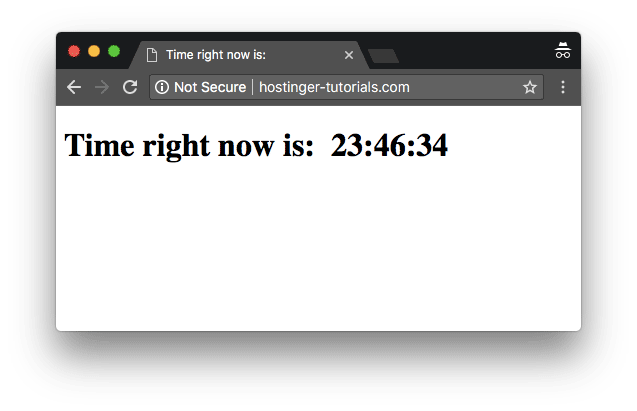
Here’s what the final result would look like: A basic example showing how to add javascript to HTML and display time
Adding JavaScript code to a separate file

Sometimes adding JavaScript to HTML directly doesn’t look like the best way to go about it. Mostly because some JS scripts need to be used on multiple pages, therefore it’s best to keep JavaScript code in separate files. This is why the more acceptable way to add JavaScript to HTML is via external file importing. These files can be referenced from within the HTML documents, just like we reference CSS documents. Some of the benefits of adding JS code in separate files are:
  • When HTML code and JavaScript code is separated, the design principle of separation of concerns is met and it makes everything a lot more sustainable and reusable.
  • Code readability and maintenance is made a lot easier.
  • Cached JavaScript files improve overall website performance by decreasing the time taken by pages to load.
We can reference the JavaScript file within HTML like this:
  1. <!DOCTYPE html>
  2. <html lang="en-US">
  3. <head>
  4. <meta charset="UTF-8">
  5. <meta name="viewport" content="width=device-width, initial-scale=1">
  6. <title>Time right now:</title>
  7. </head>
  8. <body>
  9. </body>
  10. <script src="js/myscript.js"></script>
  11. </html>
The contents of the myscript.js file will be:
  1. let d = new Date();
  2. document.body.innerHTML = "<h1>Time right now is: " + d.getHours() + ":" + d.getMinutes() + ":" + d.getSeconds()</h1>"
Note: Here it’s assumed that the myscript.js file is present in the same directory as the HTML file.

JavaScript example to validate an email address

JavaScript powers your application by helping you validate user input at the client side. One of the most important user inputs that often need validation is email addresses. This JavaScript function can help you validate the entered email address before sending it to the server:
  1. function validateEmailAddress(email) {
  2. var re = /^(([^<>()[\]\\.,;:\s@\"]+(\.[^<>()[\]\\.,;:\s@\"]+)*)|(\".+\"))@((\[[0-9]{1,3}\.[0-9]{1,3}\.[0-9]{1,3}\.[0-9]{1,3}\])|(([a-zA-Z\-0-9]+\.)+[a-zA-Z]{2,}))$/;
  3. return re.test(email);
  4. }
  5. function validate() {
  6. $("#result").text("");
  7. var emailaddress = $("#email").val();
  8. if (validateEmailAddress(emailaddress)) {
  9. $("#result").text(emailaddress + " is valid :)");
  10. $("#result").css("color", "green");
  11. } else {
  12. $("#result").text(emailaddress + " is not correct, please retry:(");
  13. $("#result").css("color", "red");
  14. }
  15. return false;
  16. }
  17. $("#validate").bind("click", validate);
In order to attach this function to a form input, you can use the following code:
  1. <form>
  2. <p>Enter an email address:</p>
  3. <input id='email'>
  4. <button type='submit' id='validate'>Validate!</button>
  5. </form>
  6. <h2 id='result'></h2>
Here’s the result that you would get after combining all the ingredients together in a HTML file:
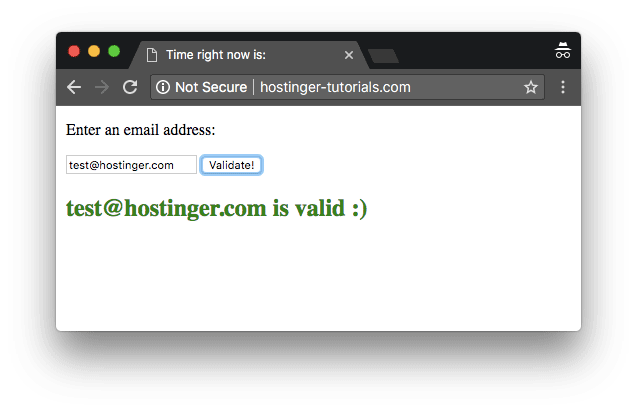
Example of how to add JavaScript to HTML and validate email successfullyAnd if the validation is incorrect, the result will differ:
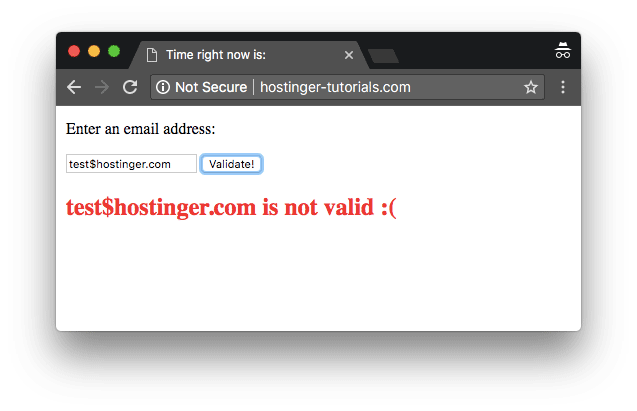
Example of how to add JavaScript to HTML and validate email unsuccessfully
Congratulations! You have learned how to add JavaScript to HTML with a few basic examples.

Final Word

In this article, we talked about the two different ways to add JavaScript in HTML code and once you get a hang of things, the possibilities of doing great things by using the two programming languages are endless. JavaScript can be used in combination with HTML to power modern web applications that are intuitive, interactive and user-friendly. By using simple client-side validation, it reduces server traffic and improves the overall efficiency of the website.

31 of the Best Internet Marketing Articles of the Year (So Far)

31 of the Best Internet Marketing Articles of the Year (So Far)

Buzz Stream gives a run down on how to create a top-notch content promotion plan, ensuring that your stellar content gets the attention it deserves.
In this comprehensive article from OkDork, Noah Kagan explains his skyscraper technique for creating great content that drives legitimate traffic.
greatest marketing articles this year
This post is incredibly detailed and takes you through the step-by-step process for seeking out topics that will perform well in your niche. Noah’s skyscraper technique has been celebrated often following this post – be sure to give it your time and attention!
Headlines a huge, as every content marketer knows. A Garrett Moon guest post on OkDork (adorable name) shows what makes a popular headline with some nice data pie charts to back it all up. Some stuff is obvious (list posts are awesome) but other tips may provide some eureka moments.
Is your brain busted? Can’t break through the writer’s block wall? Entrepreneur is coming to the rescue, showing you how to think up 50 fresh article ideas in less time than it takes to watch an episode of Modern Family.
While the “all you need is great content” manta is slung around more than sloppy joes at a middle school food fight, we all know it takes a hell of a lot more than “great content” to run a successful website. Creating awesome content is step 1, but what comes after that? Robbie Richards clues us in to 16 awesome strategies and tools to use for content promotion. Really good stuff here you may not have seen before!
content promotion strategies
The Buffer blog brings us another super special study: the ideal length for everything online, backed by real research. Get the highlights with a quick flick through and read the details if you’d like. Learn the perfect number of words in a headline, characters in a tweet, words in Facebook posts, and more.
best online marketing articles

Best Internet Marketing Articles: SEO

Panda and its successors have forever altered the SEO landscape. This guide from The Moral Concept gives you all the “dos” and “don’ts” to avoid the Panda landmines and create a Google-friendly site.
best internet marketing articles of the year
Moz provides a comprehensive guide to modern link building, covering all the nitty-gritty details you need to be a successful link builder. Learn how to create a blogger outreach list, how to craft a solid outreach email, how to conduct broke link building, and SO much more.
This awesome collection of Google Analytics resources from Kiss Metrics will help you become an analytics master. Dig into guides detailing every aspect of Google Analytics, from data segmentation to split testing.
This year marks two decades of robots.txt. Brian Ussery discusses why robots.txt exists and common robots.txt mistakes that are best avoided.
Jenny Halasz of Search Engine Land offers words of advice and guidance to the next SEO generation. Take to heart young online marketers – the future is now!

Best Internet Marketing Articles: Google News

As Google’s menagerie grows large enough to rival Disney’s Animal Kingdom, more technical tranquilizers and Serengeti strategy is needed to keep from being devoured alive (and no way are hummingbirds are harmless – they could poke your eye out in an instant!) Moz provides a comprehensive explanation of Google’s major algorithm updates and how to play nice with the wild beasties.
Google announces HTTPS as an official search ranking signal. While it’s only a light signal for now, it’s worth reading up and considering if you should transition to HTTPS (if you haven’t already).
Google slapped you across the face and left a nasty bruise – what next? Data Dial helps you get on the road to recovery with a walkthrough guide for recuperation. Put away those frozen peas, help is here!
guide to google penalty removal
2014 marks the demise of the Google Authorship experiment, simply proving that Google is as fickle a mistress as ever. Search Engine Land provides a sweet eulogy for this now-buried feature that once rocked the online search landscape. What happened Google Authorship? You were the chosen one! You were supposed to bring peace and balance to the search world, not leave it in darkness. Oh well. There’s always Google+…

Best Internet Marketing Articles: Email Marketing

Buffer blog brings us a great article about how to double your email subscribers! Sounds too good to be true? Read and see for yourself.
If you’re on the hunt for leads (and who isn’t?) check out Unbounce’s awesome assortment of lead-generating tips. Get your pen and paper ready, because those names and numbers will soon be flooding in!
top marketing articles of the year
A great email is useless if no one reads it – learn which email subject lines you need to get noticed in the inbox. From yours truly!

Best Internet Marketing Articles: Social Media

We take you through all things Facebook – from advertising 101 to social posts that drive engagement and dialogue. We’ve got you covered with this one-stop shop for Facebook marketing.
great internet marketing articles
Margot daCunha of WordStream takes us through six spectacular social media strategies that will continue to prove valuable long after 2014 comes to a close.
Search Engine Watch takes us through a lesson in hashtags, covering the history of hashtags online and citing successful hashtag campaigns. #HashtagHelp
HubSpot gives 50 short and sweet Twitter tips that every marketer should skim through. The coolest part? Every tip is tweetable! It’s tweetception - quick, get Leo over here!
Kiss Metrics explains how to get the most out of your social media networks by reposting your content multiple times. You’ll even get help developing a social sharing schedule to ensure that you’re sharing your content multiple times without getting labeled as a spammer.
Our own Larry Kim dishes out 13 strategies for fighting the new brand bashing Facebook algorithm blues.
best social media articles of the year
Facebook has been wreaking havoc on brand engagement since their algorithm update in June 2014. Organic engagement has plummeted for everyone from Disney to Intel, as this report for Contently illustrates.
If you don’t know about IFTTT it’s time to learn! IFTTT is a free automation tool that lets you connect functionality between different apps. For example, you could use IFTTT to automatically post your instagram pics on Twitter. IFTTT is one of the tools featured in our social media promotion tools. In this post, Seer Interactive details the ultimate list of IFTTT recipes specifically for marketing masters. Check it out!
top internet marketing articles
B2B Marketing Mentor provides some awesome data on how many social media outlets the average marketer uses, how many social media posts marketers conduct each day, how many marketers schedule posts in advance, etc. Definitely an interesting study worth taking a look at.
Unbounce elaborates on some obvious tactics, brining the discussion to some not-so-obvious places. Studies have shown emoticons increase comments, but as Unbounce shows, not all emoticons are created equal! :0

Best Internet Marketing Articles: Conversion Optimization

Qualaroo presents a thorough guide to conversion rate optimization. Learn why it matters and how to create your own tailored testing and optimization plan. Long live CROs, the true defenders of the realm.
You thought you knew conversion rates – but you thought wrong! Larry Kim debunks some common conversion rate canon and shows what a truly good conversion rate looks like.
Copyblogger takes us into some intense conversion rate testing with call-to-action buttons. See what works and what doesn’t in this super thorough and handy article.
Are you thinking: I can’t believe they didn’t include ___________ in the list!? Tell us what digital marketing news we missed in the comments!

how to make web sit very easy by godady:

how to make web sit very easy  by godady:


https://ae.godaddy.com/

BIDDING ON FREELANCE WORK: THE GOOD, THE BAD AND THE UGLY November, 04, 2013  by  Linda Singer We have heard about the growth in ...